Finding a clear and attractive TikTok thumbnail is not always easy, especially when many images are blurry or come with watermarks. A good thumbnail plays an important role in catching attention, analyzing competitors, or building your own content ideas. In this guide, you’ll discover 5 simple and effective ways to get high-quality TikTok thumbnails without blur or watermark. All methods are free, easy to use, and work on both mobile and desktop devices.
Why TikTok Thumbnails Matter for Engagement
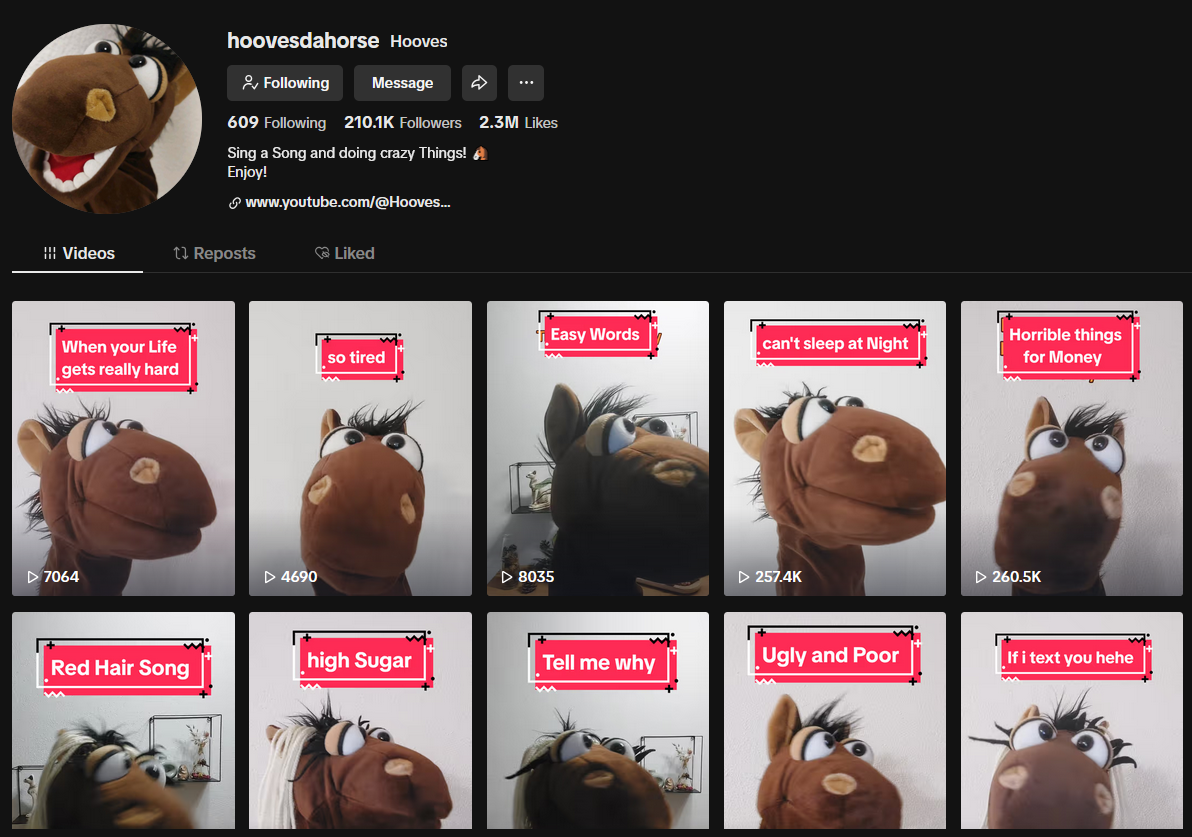
A TikTok thumbnail is the preview image shown before users click to watch a video, acting as the very first gateway that determines whether the video gets attention or not.
Therefore, a high-quality thumbnail can directly impact a video’s visibility and engagement performance, including:
-
Instantly attract attention: A clear and eye-catching thumbnail helps the video stand out among countless posts on the feed.
-
Increase click-through rate (CTR): An appealing image makes viewers more curious and more likely to click and watch.
-
Reduce the chance of being skipped: In a highly competitive TikTok environment, blurry or unattractive thumbnails are often ignored.
-
Support a professional channel image: Consistent and high-quality thumbnails make a channel look more polished and trustworthy.
-
Make content and trend analysis easier: Thumbnails also reflect content strategies and trending styles used by competitors.
In short, a thumbnail is not just a visual element but a key factor that determines the initial success of a TikTok video.
A TikTok thumbnail is the preview image shown before users click to watch a video
5 Ways to Get High-Quality TikTok Thumbnails Without Blur or Watermark
There are many ways to extract thumbnails from TikTok videos today, but not all methods produce clear, high-resolution images without watermarks. Choosing the right method helps you get high-quality thumbnails that are useful for content creation or video analysis.
Below are 5 simple and effective ways to get high-quality TikTok thumbnails that are sharp, clear, and free of watermarks:
1.Get Thumbnail Directly from TikTok
One of the simplest and highest-quality ways to get a TikTok thumbnail is by using the built-in Edit cover feature inside the app. This is a native method, meaning you don’t need any external tools.
With this feature, you can choose a specific frame from your video as the thumbnail before posting, ensuring the image is sharp and not compressed by third-party tools.
How to do it:
-
When uploading a video on TikTok, select Edit cover
-
Drag the timeline to find the most suitable frame
-
Choose a clear frame with good composition and no blur
-
Adjust the display position if needed
-
Save it as your official video thumbnail
This method is considered the most optimal because the thumbnail is taken directly from the original video, ensuring high clarity with no watermark or quality loss.
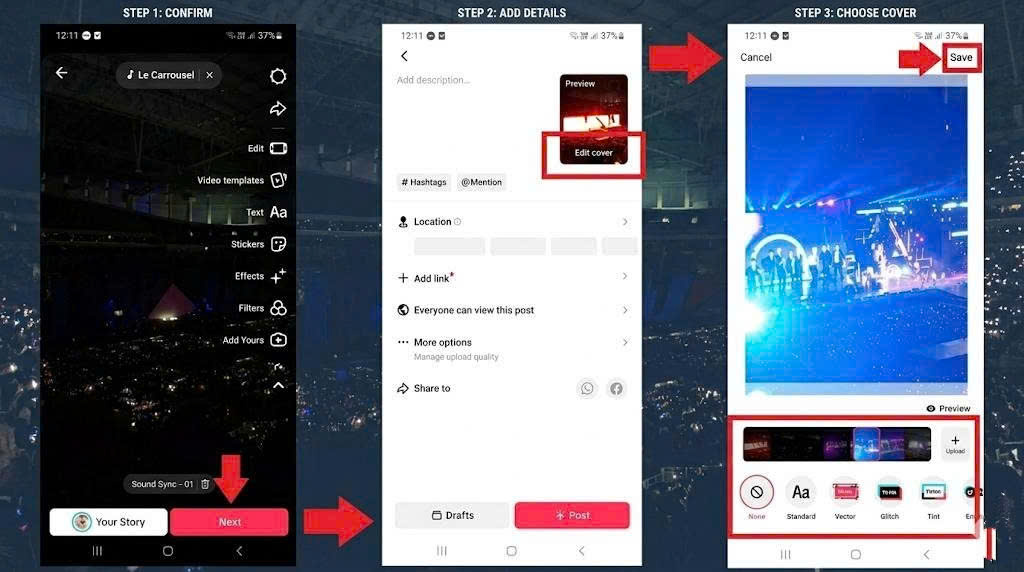
One of the simplest and highest-quality ways to get a TikTok thumbnail is by using the built-in Edit cover feature inside the app
2.Use SnapTik
SnapTik is an online tool that allows you to quickly download TikTok videos and extract thumbnails without installing any software. It is a popular choice thanks to its simple interface, fast processing speed, and compatibility with both mobile and desktop devices.
In particular, you only need to paste a TikTok video link to get a high-quality thumbnail image, making it very useful for content research, inspiration, or video analysis.
Here is a detailed step-by-step guide to using SnapTik to get TikTok thumbnails:
-
Step 1: Copy the TikTok video link: Open the TikTok video you want to extract the thumbnail from, tap Share, then select Copy link.
-
Step 2: Access the SnapTik tool: Open the SnapTik website on your mobile or desktop browser. (If needed, you can quickly access it via a pre-inserted tool link to save time.)
-
Step 3: Paste the video link into the input field: Paste the copied TikTok link into SnapTik’s input box and wait for the system to process the video.
-
Step 4: Choose the image or preview frame option: Once the tool finishes processing, select the image/thumbnail or preview frame option to download.
-
Step 5: Download the thumbnail to your device: Choose the highest available quality (HD if possible) to ensure a sharp and clear image.
SnapTik is ideal when you need to quickly extract thumbnails for content research, competitor analysis, or idea generation without spending time on editing.

3.Use SSSTik or Other Online Tools
SSSTik is another popular online tool that helps you download TikTok videos and extract thumbnails easily without installing any software. In addition to SSSTik, there are also many similar web-based tools that work in almost the same way, giving you multiple options depending on your needs.
These tools are especially useful when you want a fast alternative or when one website is temporarily unavailable. They are all designed to work directly on your browser, making the process simple and convenient.
Below is a step-by-step guide to using SSSTik or similar online tools:
-
Step 1: Copy the TikTok video link: Open the TikTok video you want to get the thumbnail from, then tap Share and select Copy link.
-
Step 2: Open SSSTik or a similar tool website: Access SSSTik or any alternative TikTok downloader through your browser on mobile or desktop.
-
Step 3: Paste the video link into the tool: Insert the copied TikTok URL into the input field and start the processing.
-
Step 4: Select the download option: After processing, choose the available image or video options, depending on what the tool provides.
-
Step 5: Download the thumbnail in high quality: Save the image in the best available resolution to ensure it stays sharp and clear.
Overall, SSSTik and other online tools are convenient solutions for users who want flexibility, speed, and multiple options when extracting TikTok thumbnails.
4.Use Mobile Apps Like SnapSave or Reposter
In addition to web tools, you can also use mobile apps such as SnapSave or Reposter to download TikTok videos and extract thumbnails more conveniently. This option is ideal for users who frequently work on mobile devices and need a faster content workflow.
The main advantage of these apps is their simplicity - you don’t need to open a browser, and you can save content directly to your phone in just a few steps.
Here is how to use them:
-
Step 1: Install SnapSave or Reposter: Download the app from the App Store or Google Play and install it on your phone.
-
Step 2: Copy the TikTok video link: Open the TikTok video you want to extract the thumbnail from, tap Share,then copy the link.
-
Step 3: Paste the link into the app: Open SnapSave or Reposter and paste the TikTok URL into the input field.
-
Step 4: Choose video or image download option: The app will display available options for downloading either the video or thumbnail image.
-
Step 5: Save the thumbnail to your device: Select the highest quality option and save the image to your phone.
This method is especially useful for content creators working on mobile, as it saves time and allows for faster, more efficient workflow compared to using web browsers.
5.Take Screenshot as a Backup Method
Taking a screenshot is the simplest and most flexible way to get a TikTok thumbnail, and it can be used as a backup method when other tools or apps are not available. Although it is not the most advanced solution, it is still widely used because of its speed and convenience.
However, to ensure the thumbnail is clear and not blurry, you need to capture it correctly.
Here is how to do it properly:
-
Step 1: Play the TikTok video in full screen: Open the video and switch to full-screen mode to maximize image quality.
-
Step 2: Pause at the best frame: Stop the video at a clear, well-lit moment with a good composition.
-
Step 3: Use a high-quality screenshot tool: Use the default screenshot feature on your phone or PC, or a high-resolution capture tool if available.
-
Step 4: Avoid motion blur or low-light frames: Choose frames where the subject is sharp and the image is stable.
-
Step 5: Crop and save the image if needed: Remove unnecessary UI elements and save the final thumbnail.
Although screenshotting may not deliver the same quality as dedicated tools or TikTok’s built-in features, it remains a quick and reliable backup option in any situation.
Tips to Get High-Quality TikTok Thumbnails Without Blur
To ensure your TikTok thumbnails are always sharp, clear, and high-quality, it’s not just about choosing the right method - you also need to optimize how you capture and select the image. Below are some important tips to help you improve thumbnail quality:
-
Always prioritize HD-quality videos: The clearer the original video, the better the extracted thumbnail quality will be, with less risk of pixelation.
-
Choose frames with good lighting: Bright and well-lit frames make thumbnails more attractive and easier to view.
-
Avoid capturing fast-motion frames: Motion blur can make your thumbnail look unclear and unprofessional.
-
Use proper tools instead of random screenshots: Dedicated tools or TikTok’s built-in features usually preserve image quality better than manual screenshots.
-
Crop the image properly to focus on the main subject: Remove unnecessary UI elements and distractions to make the thumbnail cleaner and more focused.
In short, a high-quality TikTok thumbnail depends not only on the tool you use but also on how carefully you select and optimize each frame.
Conclusion
In short, getting a high-quality TikTok thumbnail without blur or watermark is completely achievable if you choose the right method and know how to optimize the image from the start. The most important factor is still selecting a clear frame with good lighting and a balanced composition so the thumbnail can immediately attract attention. During the process, you can use SnapTik to quickly download and extract thumbnails, helping you save time while maintaining stable image quality. However, no matter which tool you use, choosing the right frame is what truly determines how sharp and effective your thumbnail will be. Hopefully, these methods will help you create better-looking thumbnails and improve the overall performance of your TikTok content.