Not being able to download TikTok videos can be a frustrating experience, especially when you come across interesting content that you want to save for later. This issue can come from various causes such as a weak internet connection, the video’s privacy settings, full device storage, or even glitches within the TikTok app itself. Instead of trying random fixes without results, this article will guide you through 7 simple and effective ways to fix the unable to download TikTok videos error on both Android and iOS devices, helping you solve the problem quickly and efficiently.
Reasons Why You can't Download TikTok Videos
The issue of not being able to download TikTok videos is quite common and can come from various factors such as network connection, device storage, app errors, or the video’s privacy settings. If you don’t identify the exact cause from the start, you may waste time trying the wrong fixes.
Common reasons why TikTok videos can’t be downloaded
-
Weak or unstable internet connection: Poor WiFi or weak mobile data can interrupt or prevent the download process.
-
Download restrictions set by the creator: The video owner may disable the Allow download option, so the save button won’t appear.
-
Full device storage: There is not enough space to save new video files.
-
TikTok cache issues: Accumulated temporary data may cause conflicts and affect some features.
-
TikTok system errors: Rare, but possible when the platform is experiencing temporary issues.
Quick way to identify the exact cause
To avoid trying random fixes, you can quickly check with these simple steps:
-
Try downloading another TikTok video (preferably a trending or popular one).
-
If other videos download normally - the issue is with the original video (usually due to download restrictions or privacy settings).
-
If no videos can be downloaded - the problem comes from your device, network, or TikTok app.
-
Quick test: switch between WiFi and mobile data (4G/5G) to check whether the issue is network-related.
Identifying the exact cause early helps you choose the right solution in the next steps and saves a lot of time by avoiding unnecessary attempts.
7 Ways to Fix the Unable to Download TikTok Videos Error
If you are experiencing issues where you cannot download or save videos on TikTok, don’t worry - below are 7 simple and effective methods to quickly fix the problem and get your TikTok video downloads working again.
1.Check Internet Connection
A weak or unstable internet connection is one of the most common reasons why you may be unable to download TikTok videos. When your network is interrupted, too slow, or unstable, the video download process may fail, stop midway, or not start at all.
To fix this, try switching between WiFi and mobile data (4G/5G), or restart your WiFi router to refresh the connection. In many cases, simply ensuring a stable internet connection is enough to get TikTok video downloads working again.
Try switching between WiFi and mobile data (4G/5G), or restart your WiFi router to refresh the connection
2.Check Video Privacy Settings
Some TikTok videos cannot be downloaded because the creator has disabled the Allow downloads option. In this case, the download button will not appear, even if your internet connection and device are working properly.
In this situation, you cannot change the video’s settings yourself. If downloads are restricted, you will need to use alternative methods or tools to save the video to your device.
3.Clear TikTok Cache and App Data
While using TikTok, the app automatically stores temporary data (cache) to help improve loading speed and enhance the user experience. However, over time, this cached data can build up or become corrupted, leading to data conflicts. This may cause some TikTok features to become unstable, including issues with downloading videos.
How to fix it:
-
Open the TikTok app go to Profile
-
Select Settings & privacy
-
Tap Free up space
-
Choose Clear cache to remove temporary data
-
After clearing, close and reopen TikTok to refresh the system
Clearing the cache will not affect your account, posted videos, or personal data, but it can help the app run more smoothly and often fix various issues, including the inability to download TikTok videos.
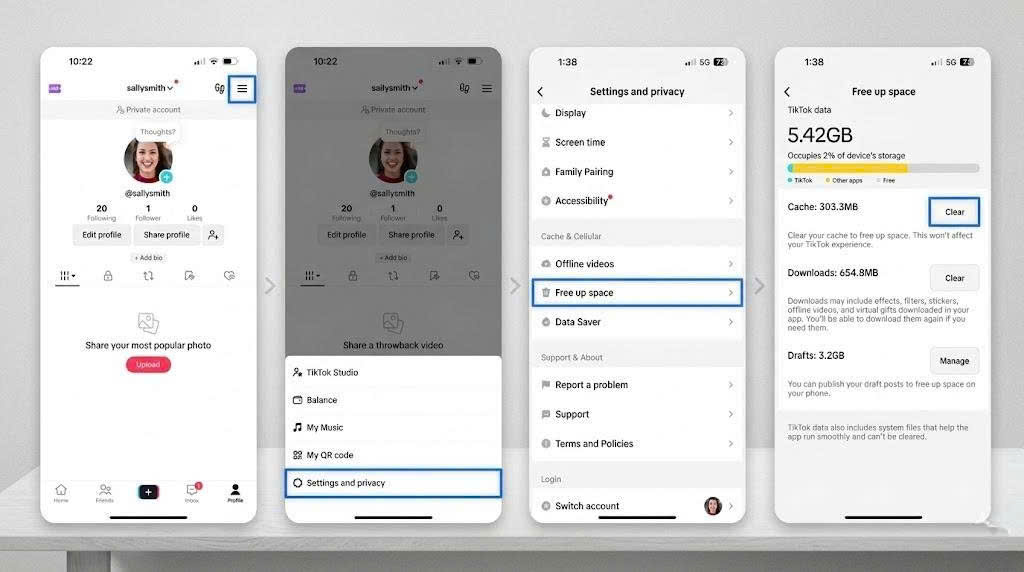
The app automatically stores temporary data (cache) to help improve loading speed and enhance the user experience
4.Check Device Storage
One common reason why you cannot download TikTok videos is that your phone does not have enough available storage. When the device storage is full, the system cannot save new files, including downloaded videos from TikTok.
How to fix it:
-
Check the available storage on your phone (iPhone or Android)
-
Delete unnecessary photos, videos, or unused apps
-
Remove downloaded files or junk data that take up space
-
After freeing up storage, try downloading the TikTok video again
When your device has enough free space, the download process will be more stable and less likely to encounter errors.
5.Update or Restart the TikTok App
An outdated version of TikTok may contain bugs or may no longer be fully compatible with the current system, which can cause issues such as being unable to download videos or unstable app performance.
How to fix it:
-
Go to the App Store (iPhone) or Google Play Store (Android)
-
Search for TikTok and check if there is an available update
-
If yes, update to the latest version immediately
-
Also, fully close the TikTok app (remove it from background apps) and reopen it to refresh its performance
Updating and restarting the app helps fix temporary bugs, improve performance, and restore normal video download functionality.
6.Restart Your Phone
In some cases, the issue of not being able to download TikTok videos is not caused by the app or the internet, but by the phone system running for too long or experiencing background software conflicts. This can interrupt certain functions, including video downloading.
-
Turn off and restart your phone
-
Wait a few seconds for the system to fully refresh
-
After restarting, open TikTok and try downloading the video again
-
If needed, close all background apps before using TikTok
Restarting your device helps free up RAM, clear temporary system errors, and return your phone to a more stable state, which improves the ability to download videos on TikTok.
7.Uninstall and Reinstall the TikTok App
If you have tried all the previous methods but still cannot download TikTok videos, the app may be experiencing system errors or corrupted installation data. In this case, uninstalling and reinstalling TikTok is the final but often very effective solution.
-
Press and hold the TikTok app and select Uninstall
-
Or remove the app via the App Store / Google Play Store
-
Then reinstall TikTok from the official app store
-
Log back into your account and check the video download feature
Reinstalling the app helps remove hidden errors and resets TikTok to a clean state, which often resolves persistent issues with video downloading.
How to Download TikTok Videos When Downloads are Disabled
In some cases, you may not be able to download TikTok videos not because of your device or internet, but because the creator has turned off the Allow downloads option. When this happens, the download button will not appear, and you cannot save the video directly as usual.
The solution in this situation is to use external tools to easily download the video:
-
Copy the TikTok video link by tapping Share - Copy link
-
Use third-party TikTok video download tools such as SnapTik to process the link
-
Paste the link into the website and wait for the system to analyze the video
-
Then download the video to your device, with the option to choose a no-watermark version if available
This method helps you bypass TikTok’s default download restrictions, especially useful when you want to save videos for later viewing or personal use. However, always use it responsibly and respect the content creator’s copyright.
Conclusion
The issue of not being able to download TikTok videos can come from several causes such as weak internet connection, full device storage, app errors, or the creator’s download restrictions. The good news is that most of these problems can be quickly fixed if you apply the 7 methods explained above. Try each solution step by step to identify and resolve the issue effectively. If you still face difficulties, you can also use video download tools to ensure you don’t miss important content. Don’t forget to save this guide or share it with others who may be experiencing the same TikTok download issue.