TikTok is currently one of the most popular social media platforms in the world, with billions of active users. To increase engagement and better understand your audience, the TikTok Poll feature has become an extremely useful tool for content creators and businesses. In this article, you will learn how to create a TikTok poll step by step in a simple way, as well as how to use this feature to boost engagement, collect quick feedback, and optimize your content more effectively.
Why TikTok Polls Are Important
TikTok Polls are an important feature that helps increase engagement and better understand your audience. On TikTok, where users scroll through content very quickly, polls allow people to respond with just a simple tap.
Here are the main reasons why TikTok Polls are important:
-
Quickly increase engagement: Users can easily participate in polls, helping videos gain more interactions and improve the chances of appearing on the For You Page (FYP).
-
Understand audience needs and preferences: Instead of guessing what your audience wants, you can directly ask them through polls to optimize your content more effectively.
-
Improve content distribution: Videos with higher engagement are more likely to be recommended by TikTok to a larger audience on the For You Page.
-
Support creators in building content strategy: Polls help identify topics, trends, or video formats that your audience is most interested in.
-
Help businesses collect customer insights: Brands can understand market demand, product preferences, and user behavior in real time.
In summary, TikTok Polls are not just an entertainment feature but also a powerful tool to boost engagement, understand your audience, and optimize your content strategy effectively.
The importance of polls on TikTok
A step-by-step guide on how to create a poll on TikTok
Creating a TikTok Poll is very simple and does not take much time. This is a built-in TikTok feature that allows you to quickly collect audience feedback with just a few basic steps.
Below is a detailed step-by-step guide to help you create a TikTok Poll:
-
Step 1: Open TikTok and tap the + button: First, open the TikTok app on your phone. On the main screen, tap the plus icon (+) at the bottom to start creating a new video.
-
Step 2: Record or upload a video: You can either record a video directly using your camera or upload an existing video from your gallery. The video content should relate to your poll question to increase engagement.
-
Step 3: Go to the Stickers section: After recording or selecting your video, move to the editing screen. Tap on the Stickers option to open TikTok’s available sticker tools.
-
Step 4: Select the Poll feature: From the sticker list, find and select the Poll option. This feature allows you to add a survey directly to your video.
-
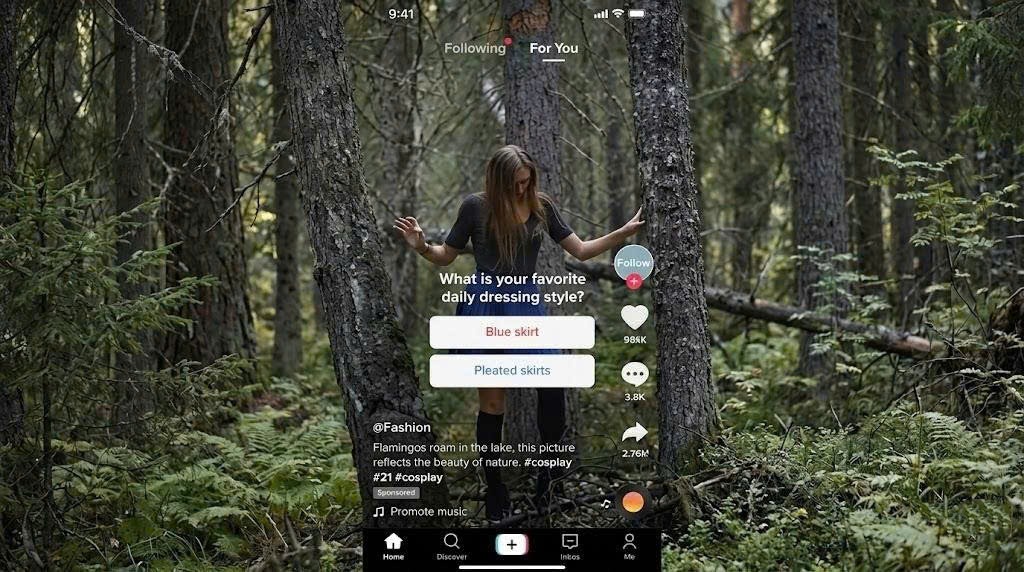
Step 5: Enter your poll question: In the Ask a question… field, type your poll question. It should be short, clear, and relevant to your audience to encourage more participation.
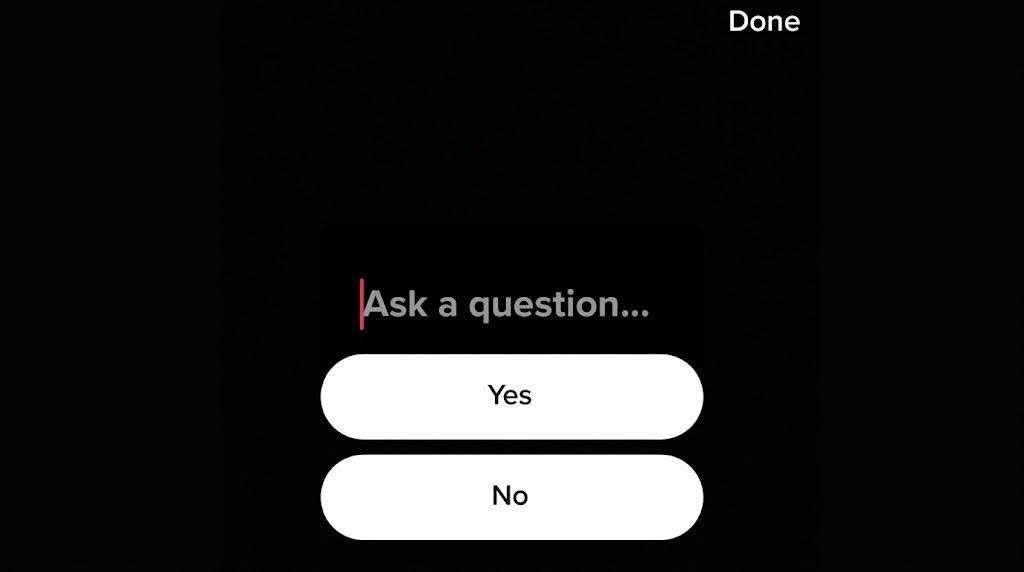
TikTok Poll Setup Interface
-
Step 6: Customize the answer options: By default, TikTok provides two options (Yes/No). However, you can edit them to better match your question, such as Option A / Option B, Yes / No, or Like / Dislike.
-
Step 7: Tap Done to finish setup: Once you have entered your question and customized the options, tap Done to save your poll. The poll will then be attached directly to your video.
-
Step 8: Finalize and post your video: Finally, you can add captions, hashtags, and adjust other settings before tapping Post to publish your video on TikTok.
After completing these steps, your video will display the poll, and viewers can instantly participate in voting. This is a highly effective way to increase engagement and quickly gather audience feedback.
Checking the Results After Posting
After you create and publish a TikTok Poll, the next important step is checking the results. TikTok makes it easy for creators to track how users are voting and understand audience preferences in real time.
Follow these steps to view your TikTok Poll results:
-
Step 1: Go to your Profile: Open the TikTok app and tap on your profile icon at the bottom right corner of the screen.
-
Step 2: Open the video containing the poll: Scroll through your posted videos and select the one that includes your poll.
-
Step 3: Tap on View vote results: On the video screen, you will see an option called View vote results. Tap on it to access the poll data.
-
Step 4: Analyze the voting results: TikTok will display the percentage of votes for each option. This helps you clearly understand which choice is more popular among your audience.
-
Step 5: Check individual voter details (if available): In some cases, you can also tap on each option to see who voted for it, giving you deeper insight into your audience behavior.
By reviewing poll results, you can better understand your viewers’ preferences, improve your content strategy, and create videos that match what your audience truly wants to see.
Smart Ways to Increase Engagement With Polls
To make your TikTok Poll more effective and attract more votes, you need not only to create it correctly but also to optimize your content strategy. An engaging poll can significantly boost interaction, increase watch time, and improve your video’s performance on TikTok’s distribution system.
If you simply create a poll without a clear strategy, it will be difficult to attract user participation. Below are some important tips to help you create more effective TikTok Polls:
-
Use a clear call-to-action (CTA): Don’t just post a poll and leave it. Encourage users to participate with simple prompts like Which option do you choose? or Vote now!. A clear CTA can significantly increase votes.
-
Keep questions short and easy to understand: Make your poll questions simple, clear, and direct. TikTok users prefer quick interactions, so avoid long or complex wording.
-
Connect the poll with your video content: Ensure your poll is relevant to the video. When the question matches the content, users are more likely to engage.
-
Leverage trending topics: Create polls based on trending topics to increase reach and engagement. Familiar trends usually attract more interaction.
-
Save and analyze TikTok videos easily with SnapTik: You can use tools like SnapTik to download TikTok videos without watermark, helping you analyze competitor polls, study engagement strategies, and improve your own content ideas more effectively.
-
Create curiosity or light debate: Use simple choices or What would you choose? questions to spark curiosity and encourage voting.
-
Use rewards or mini-games (if applicable): Small incentives like giveaways can boost participation and make users more willing to vote.
-
Analyze results for future content: Don’t stop at creating polls - use the results to understand your audience and improve future content strategy.
In summary, creating effective TikTok Polls requires a combination of engaging content, well-targeted questions, and strong interaction strategies. When done correctly, polls not only increase engagement but also help you build a more sustainable content strategy on TikTok.

Smart Ways to Increase Engagement With Polls
Common Errors Creators Should Avoid
Many creators make simple mistakes when using TikTok Polls, which can reduce engagement and limit overall performance. Avoiding these errors will help you get better results and more accurate audience insights.
-
Creating irrelevant polls: One common mistake is making polls that are not related to the video content. When the poll feels disconnected, users are less likely to participate.
-
Writing unclear or complicated questions: If your question is too long or difficult to understand, viewers may skip it instead of voting.
-
Missing a clear call-to-action: Many creators forget to encourage users to vote. Without a CTA, viewers often scroll past without interacting.
-
Overusing polls too frequently: Adding polls in every video can make your audience lose interest and reduce engagement over time.
-
Ignoring poll results: Not analyzing the results after posting is a missed opportunity to understand your audience and improve future content.
Conclusion
TikTok Polls are a simple but powerful feature that helps creators and businesses increase engagement and better understand their audience. By using polls effectively, you can quickly collect feedback, improve interaction, and create content that matches what viewers actually want. To get the best results, make sure your poll questions are clear, relevant, and easy to answer. At the same time, don’t forget to encourage users to participate and analyze the results to refine your future content strategy. Overall, TikTok Polls are not just an extra feature- they are a valuable tool for boosting engagement and growing your presence on TikTok in a more strategic way.