Have you ever wondered why some duet videos on TikTok go viral so easily while yours don’t? The truth is, with the right duet strategy, you can turn a simple video into content that attracts thousands of views. In this guide, you’ll learn how to duet effectively with easy steps that are perfect for beginners looking to grow quickly on TikTok.
What TikTok Duet Is
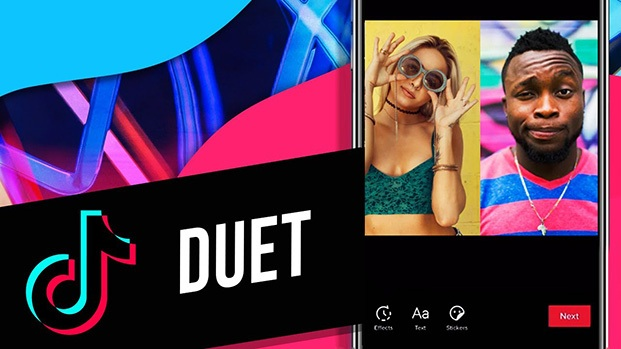
TikTok Duet is a feature that allows you to record a video side by side with another video directly on the platform. In simple terms, you can combine your video with an existing one to create more engaging content without starting from scratch.
This feature is widely used for different types of content such as reactions, lip-syncing, dance trends, or replying to other users’ videos. It helps you catch trends faster and boost engagement more easily.
TikTok Duet is a feature that allows you to record a video side by side with another video directly on the platform
How TikTok Duet Works
-
The screen is split into two sections
-
One side shows the original video, the other shows your recording
-
Both videos play at the same time, creating a real-time interaction feel
-
You can react, perform, or respond to the original content
-
You can edit, add effects, sounds, or voiceover before posting
-
The final video is published as a new post on your account
One important thing to note is that not all videos allow Duet. If you don’t see the Duet option, the original creator may have disabled this feature in their privacy settings.Thanks to its simple yet flexible format, Duet is one of the easiest ways for beginners to create content and increase their chances of going viral on TikTok.
Why Duet Videos Can Go Viral on TikTok
It’s not by chance that many Duet videos on TikTok easily go viral. In fact, this is one of the content formats that the algorithm tends to favor because of its high engagement potential.
Here are the main reasons why Duet videos have a better chance of going viral:
-
Leverage trending content: You don’t have to start from scratch. By using videos that are already popular, your content is more likely to be recommended.
-
Increase watch time: With two frames playing at once, viewers tend to stay longer to watch both sides, which sends a positive signal to the algorithm.
-
Create a sense of real interaction: Duet makes it feel like you’re directly engaging with the original video, encouraging more comments and reactions.
-
Easy to jump on trends: You can quickly create content by using viral videos, helping you keep up with trends in just minutes.
-
Reach a wider audience: Dueting with popular creators gives you a chance to tap into their existing audience.
-
More dynamic and engaging content: Two perspectives in one screen make the video more interesting and keep viewers curious.
Duet is not just a feature, it's a powerful way to leverage trends, boost engagement, and increase your chances of going viral on TikTok.
Step by Step Guide to Create a Duet Video
If you’ve never used this feature before, don’t worry. Dueting on TikTok is very simple. Just follow the steps below and you can create your own Duet video in minutes.
Steps to Duet on TikTok
-
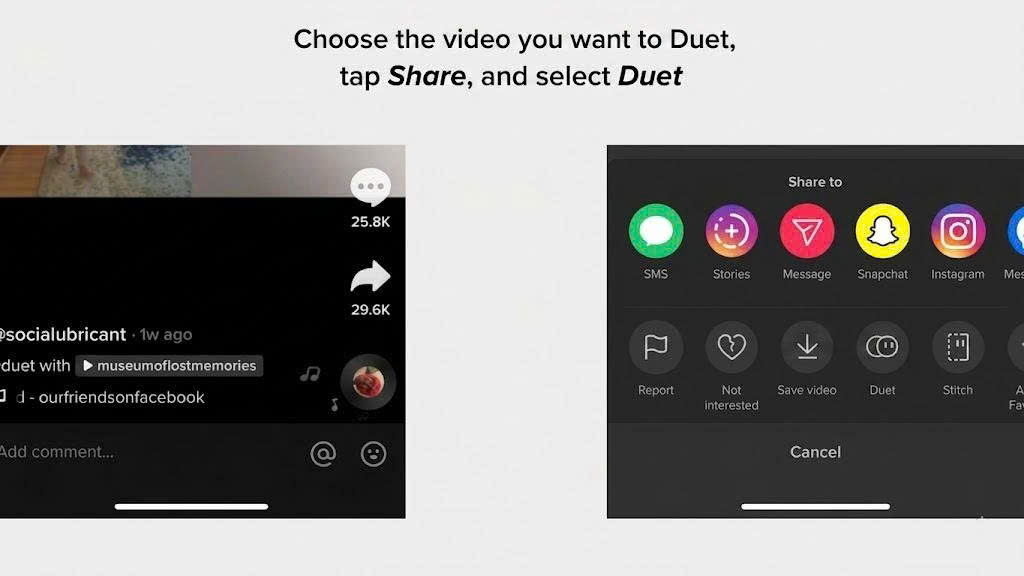
Step 1: Open TikTok and choose a video to Duet - Find a video you want to interact with. It’s best to pick trending videos to increase your chances of going viral.
-
Step 2: Tap the Share icon - This arrow icon is located on the right side of the screen.
-
Step 3: Select Duet - If you don’t see the Duet option, the creator may have disabled it.
-
Step 4: Allow access to camera and microphone - TikTok needs these permissions so you can record your video.
-
Step 5: Start recording your Duet - Tap the record button and create your content such as reactions, dancing, or interacting with the original video.
-
Step 6: Edit your video - Add effects, filters, sounds, or adjust speed to make your video more engaging.
-
Step 7: Post your video - Add a caption, relevant hashtags, and choose your visibility settings before publishing.
Quick Tips for Beginners
-
Choose trending videos to increase visibility
-
Keep your video short and hook viewers within the first 3 seconds
-
Use expressions or actions to boost engagement
With just a few simple steps, you can start creating Duet videos and improve your chances of going viral on TikTok.
Using Sound and Voiceover in Duet Videos
Besides creating a standard Duet video, TikTok also allows you to keep the original sound or add your own voiceover to make your content more engaging. This is a great way to personalize your video and attract more viewers.
How to Duet on TikTok with Original Sound
To keep the original audio in your Duet, simply:
-
Follow the Duet steps mentioned above
-
Make sure the original sound is not muted while recording
-
Adjust the volume between the original audio and your microphone in the editing section
-
Preview the video before posting to ensure the sound is clear
Tip: Keep the original sound if it’s a trending audio to increase your chances of getting recommended.
How to Add Voiceover to a Duet Video
If you want to add commentary, reactions, or your own perspective, use the voiceover feature:
-
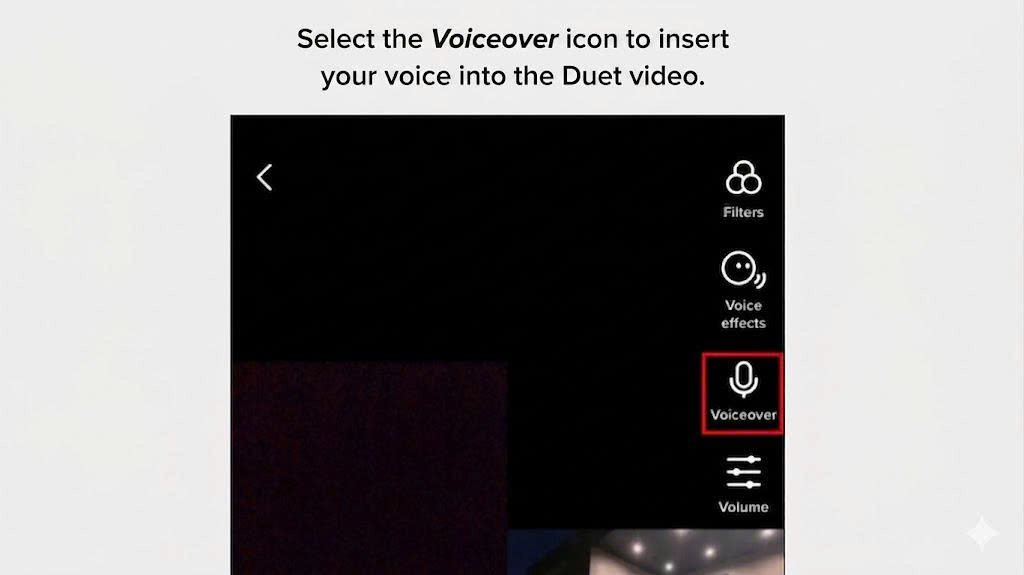
After recording your Duet, tap the Voiceover (microphone icon)
-
Press and hold the record button to start recording your voice
-
Choose specific parts of the video where you want to add your voice
-
Save once you’re done
Tip: Speak clearly and keep it concise, focusing on the most interesting parts to retain viewers.
When to Use Original Sound or Voiceover
-
Use original sound for dancing, lip-syncing, or trending content
-
Use voiceover for reactions, explanations, or storytelling
-
Combine both to create content that is both trendy and unique
Using audio effectively can make your Duet more engaging and improve your chances of going viral on TikTok.
Tips to Make Your Duet Go Viral on TikTok
Knowing how to duet on TikTok is not enough. To increase your chances of going viral, you need to optimize your content and execution. Here are some effective tips:
-
Choose trending videos: Focus on videos with high views and engagement so you can leverage existing popularity and improve your chances of being recommended.
-
Create a strong hook in the first 3 seconds: Use expressions, actions, or a surprising moment to grab attention and stop viewers from scrolling away.
-
Interact naturally with the original video: Don’t just record passively. React, respond, or perform alongside the original content to make your video more engaging.
-
Keep audio clear and visuals bright: Avoid noisy audio or dark footage, as poor quality can quickly make viewers lose interest.
-
Write short captions and use relevant hashtags: Use engaging captions and hashtags like #duet #fyp #viral to improve visibility without overloading them.
-
Use TikTok download tools for content ideas: You can use tools like SnapTik to save viral TikTok videos without watermark for reference, helping you analyze trends and create better Duet content.
-
Post at the right time: Upload during peak hours such as midday or evening to maximize your initial reach.
Applying these tips can help your Duet videos gain more engagement, retain viewers longer, and significantly increase your chances of going viral on TikTok.
Conclusion
Duet on TikTok is not just an entertainment feature but also an effective way to boost engagement and increase your chances of going viral. Once you understand how it works, know how to do it properly, and apply optimization tips, you can easily create videos that attract thousands of views even as a beginner. The most important factor is not creating overly complex videos, but choosing the right content, quickly jumping on trends, and interacting naturally with the original video. With consistent practice, you will gradually develop your own style and grow your TikTok channel more effectively. Start with a simple Duet video today and apply what you’ve learned to see the results for yourself.