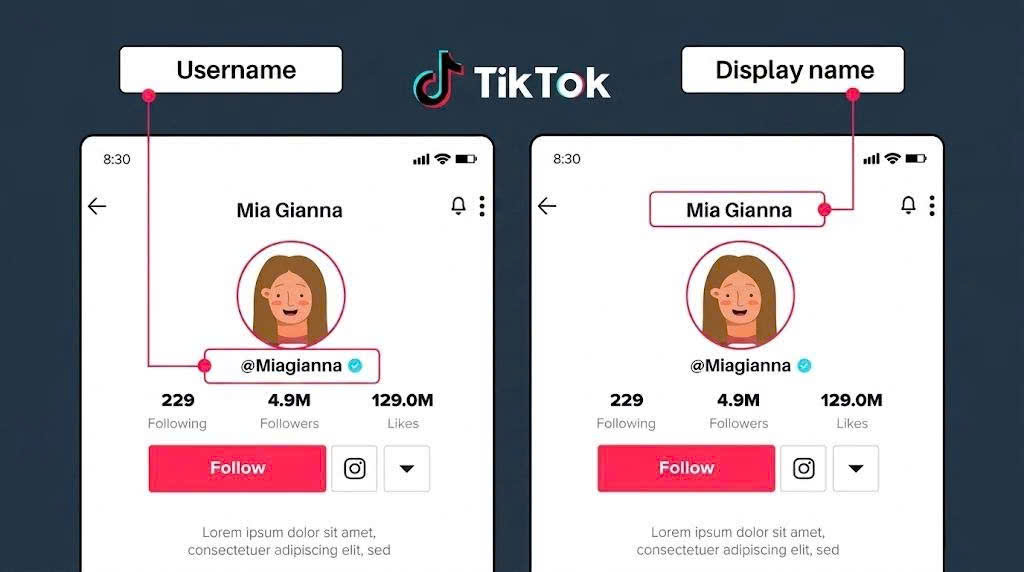
Accidentally deleted an important TikTok video and don’t know how to get it back? Don’t worry - you still have a chance to recover it if you act quickly. In this guide, you’ll learn step-by-step how to recover deleted TikTok videos using simple and effective methods. Whether your video was removed from your device, drafts, or your account, there are still ways to restore it and avoid losing your valuable content permanently.
Why Videos Get Deleted and Whether They Can Still Be Recovered
TikTok videos can be deleted or disappear for many different reasons, and in most cases, this does not mean the data is permanently lost immediately. In some situations, the video may only be temporarily hidden, not fully synced, or still stored in certain locations on your device or within the system.
Some common reasons why TikTok videos may be deleted or no longer visible include:
-
Accidental deletion while managing or cleaning up your profile
-
Technical issues within the TikTok app causing incomplete syncing between the device and server
-
Videos being removed by the system due to community guideline or copyright violations
-
Logging out of the account, changing devices, or reinstalling the app, causing temporary data unavailability
-
Videos not being saved to the device or backed up to cloud storage
The important thing to understand is that not every case of a disappearing video means it has been permanently deleted. In many situations, the data may still exist in the device gallery, recently deleted folder, backup storage, or even in temporary cache memory.
That’s why, if you act early and use the right methods, the chances of recovering your video are still quite high. However, if too much time passes, data gets overwritten, or no backup exists, the ability to restore it will significantly decrease over time.
In the next section, we will go through the exact methods to help you recover deleted TikTok videos quickly and effectively.
TikTok videos can be deleted or disappear for many different reasons
Step-By-Step Methods to Restore Lost Videos
To increase the chances of recovering deleted TikTok videos, follow the steps below in order:
-
Step 1 Check your device photo library: Open your gallery or file manager and look in the recent or video folders. Many TikTok videos are automatically saved when uploaded or edited so a copy may still exist on your device
-
Step 2 Check the recently deleted folder: Go to the recently deleted section in your photo library. If the video has not exceeded the retention period usually around 30 days you can restore it immediately
-
Step 3 Look for backup or storage folders: Check folders such as downloads TikTok or cloud storage like Google Photos or iCloud if enabled Sometimes a copy of the video is stored without you noticing
-
Step 4 Check for display or syncing issues: Log out and log back into your TikTok account or update the app to make sure the video is not hidden due to syncing errors
If you still cannot find the video after all these steps you can move on to advanced methods such as recovering from drafts or contacting TikTok support
Recover Videos From The Drafts Folder
If you usually save videos before posting, your deleted content may still be available in the TikTok Drafts folder. This is one of the simplest and most effective ways to recover videos that many users often overlook.
Follow the steps below:
-
Step 1 Go to your TikTok profile: Open the TikTok app and tap Profile to access your account page
-
Step 2 Open the Drafts folder: On your profile page, find and tap Drafts. This is where all videos that have been created but not posted are stored
-
Step 3 Check for the video you need: Browse through your drafts to locate the video you want to recover. If it is still there, you can open it for editing or repost it immediately
-
Step 4 Save or repost the video: Once you find the video, you can either post it directly to TikTok or save it to your device to prevent future loss
Important note: Draft videos are stored locally on the device where they were created. If you uninstall the app, log out of your account, or switch devices, these videos may be permanently lost
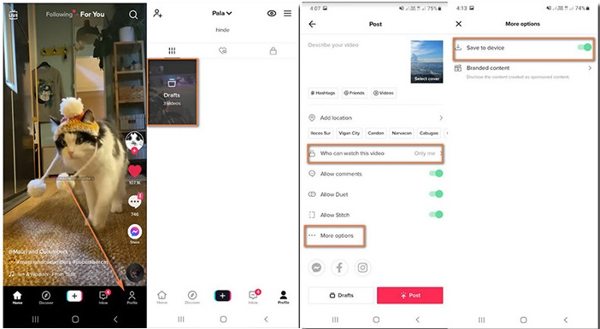
This is one of the simplest and most effective ways to recover videos that many users often overlook.
Contact TikTok Support to Restore Lost Videos
If you have tried all methods but still cannot find your video, the final option is to contact TikTok directly and submit a support request. This method is used when the video may have been affected by a system error or accidentally removed by the platform.
Follow the steps below:
-
Step 1 Access TikTok settings: Open the TikTok app, go to your profile, tap the menu icon in the top corner, then select Settings and privacy
-
Step 2 Go to Report a problem: Scroll down and find Report a problem to start sending a support request to TikTok
-
Step 3 Select the video related issue: Choose the Video and sound category or use the search bar to find options related to video recovery
-
Step 4 Submit a detailed request: Tap the feedback or submit report option, then clearly describe the issue including when the video was posted and what happened to it to improve the chances of recovery
Response time may take 24 to 72 hours, and not all requests will be approved depending on TikTok policies and data availability
Comparison of Recovery Methods
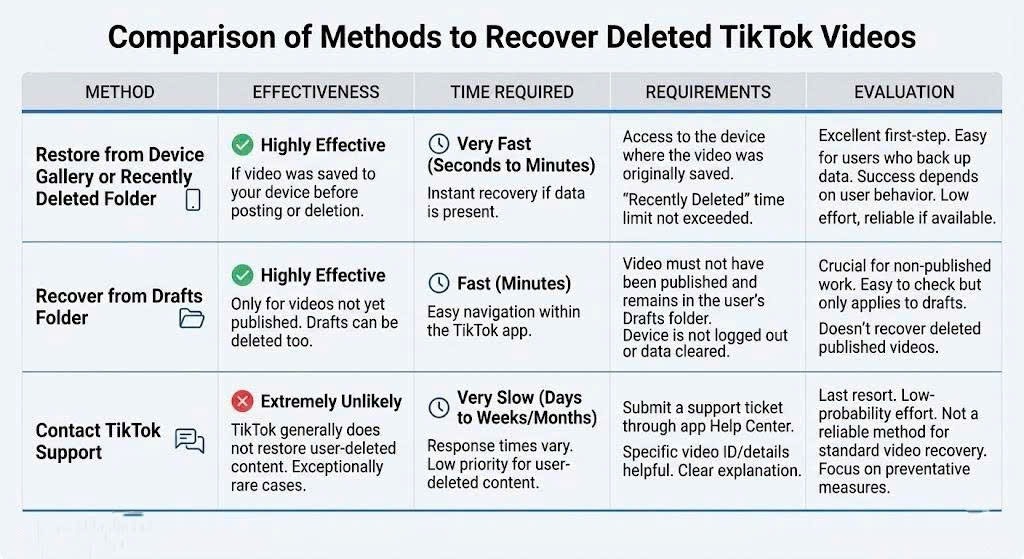
The methods for recovering deleted TikTok videos differ in speed, effectiveness, and required conditions:
-
Device gallery or recently deleted folder: The fastest and simplest method, highly effective if the video is still stored on the device and acted on quickly.
-
Drafts folder: Effective if the video was saved as a draft, but depends on whether the app data is still intact.
-
Contacting TikTok support: Only used when no other options work. The process takes longer and recovery is not guaranteed.
Each method has its own advantages, so you can choose the most suitable one depending on your specific situation. The most important thing is to correctly identify the current status of your video in order to apply the most effective and time-saving recovery method.
Important Notes When Recovering Deleted TikTok Videos
During the process of recovering deleted TikTok videos, following the correct steps at the right time plays a very important role, as it directly affects the chances of successful recovery. If you take the wrong actions or wait too long, the video may be overwritten and become impossible to restore.
-
Try to recover the video as soon as you notice it is missing to avoid permanent data loss
-
Carefully check all possible storage sources such as device gallery, recently deleted folder, and any available backups before concluding that the video is gone
-
Avoid uninstalling the TikTok app, logging out of your account, or switching devices while trying to recover the video
-
Do not use third-party tools or unknown apps, as they may pose security risks
-
Always prioritize official recovery methods from your device or the TikTok platform
Overall, being careful at each step significantly increases your chances of successfully restoring your important videos in a safe and effective way.
How to Prevent Losing TikTok Videos in the Future
To avoid spending time trying to recover deleted TikTok videos, you should proactively protect your content from the beginning. Building proper saving and backup habits will significantly reduce the risk of data loss, especially when facing app errors, accidental deletion, or device changes.
-
Always enable the option to save videos to your device before posting to create a backup copy
-
Use cloud services such as Google Photos or iCloud to automatically back up all videos, and you can also use SnapTik to download your own TikTok videos for high-quality offline backup without watermark
-
Avoid uninstalling the app or logging out of your account unless you are sure your data is safely backed up
-
Double-check content before deleting to avoid removing important videos by mistake
-
Keep the original version of your video before editing or reposting it on TikTok
By maintaining these simple habits, you can take better control of your content and greatly reduce the risk of losing videos in the future.
Conclusion
Recovering deleted TikTok videos is completely possible in many cases if you act correctly and in a timely manner. Depending on the situation, you can restore videos from your device, drafts folder, or contact TikTok support to increase your chances of retrieving important content. Each method has a different level of effectiveness, so the key is to identify the right situation and apply the most suitable solution. In addition, proactively backing up and managing your videos from the start will help you significantly reduce the risk of data loss in the future. Choose the most appropriate solution based on your needs to better protect your important creative content on TikTok.