TikTok slideshows are everywhere - from aesthetic photo dumps to viral storytelling content. But when you try to download them, that annoying watermark can ruin the entire look. So how do you keep the content clean and ready to reuse? In this guide, you’ll discover how to save TikTok slideshows without watermark in just seconds using quick, beginner-friendly methods. Whether you’re a casual user or a content creator, these solutions will help you download high-quality slideshows effortlessly - no technical skills needed.
Why Watermarks on TikTok Slideshows Can Be Annoying
TikTok slideshows usually come with a watermark that includes the TikTok logo and the creator’s username. While this helps protect copyright and promote the platform, for many users, watermarks can be quite inconvenient:
-
Reduced viewing experience: Watermarks often appear in the center or bottom corner of slideshows, covering important details. Especially for artistic, aesthetic, or storytelling slideshows, the watermark can make the content look less polished.
-
Harder to share on other platforms: When reposting to Instagram, Facebook, or YouTube Shorts, watermarks make slideshows appear less professional. Some platforms may limit content with watermarks, reducing reach and engagement.
-
Limits creative use: If you want to merge the slideshow into other videos or edit it for new content, the watermark becomes a barrier. Cropping, layering text, or adding visuals can take extra time and effort.
-
Affects personal storage: Users who want to save slideshows for offline viewing or personal use prefer clean versions. Watermark-free slideshows are tidier, easier to manage, and more flexible in different situations.
-
Impacts aesthetics and overall quality: Watermarks can make videos look cluttered, especially slideshows focused on beautiful images or color harmony. Keeping content clean ensures slideshows are visually appealing when shared or used in personal projects.
That’s why the demand for downloading TikTok slideshows without watermarks is growing - it preserves quality while optimizing the viewing and sharing experience.
When You Can Download TikTok Slideshows Without Watermark
Not every TikTok slideshow can be downloaded without a watermark. Understanding when it’s possible and how to do it safely will save you time and help avoid copyright issues:
-
Your own slideshows: Any videos or slideshows you uploaded to TikTok can be downloaded watermark-free. Use the app’s Save Video feature to get a clean, high-quality copy.
-
Slideshows with public download enabled: Some creators allow viewers to download their content without a watermark. In these cases, you can download directly or use reputable online tools without violating copyright.
-
Private or restricted slideshows: If a slideshow is private or the creator disables downloads, you cannot download it directly without potentially breaking copyright rules. The safest option is to ask the creator for permission or save it for personal viewing only.
-
Cases where watermark is required: Some slideshows must retain the TikTok logo to protect content ownership. Respecting watermark rules ensures you don’t repost illegally, as it serves as a legal marker of ownership.
Knowing when you can and cannot download helps you choose the right method, respect copyright, save time, and still get clean slideshows for personal use or legal sharing.
Quick Methods to Save TikTok Slideshows Without Watermark
There are several ways to download TikTok slideshows without a watermark, ranging from simple to advanced. Depending on your needs - fast download, high quality, or no extra apps - you can choose the method that works best:
Use TikTok’s Built-in Download Feature
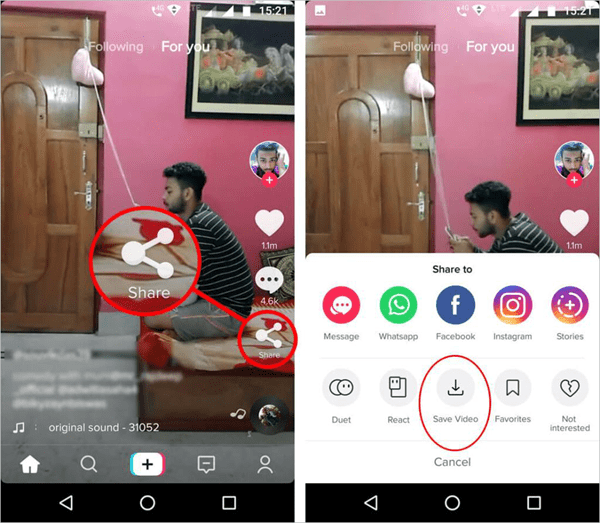
If you’re trying to save a slideshow that you originally posted on TikTok, the easiest and safest method is to use the platform’s built-in download feature. This option allows you to export your content directly to your device without needing any third-party tools. Since the slideshow belongs to you, TikTok gives you full control, making it possible to download a clean version quickly and securely.
To do this, simply open your slideshow on TikTok, tap the three-dot icon, and select Save Video. Within seconds, the file will be stored on your device in its original quality. This method is especially useful for content creators who want to reuse their slideshows on other platforms or keep a backup. However, keep in mind that this feature typically works only for your own content, so for other users’ slideshows, you’ll need alternative methods.
TikTok’s Built-in Download Feature
Use Third-Party Apps
Besides downloading directly from TikTok, you can also use third-party apps to save slideshows without a watermark quickly. These apps are specifically designed for downloading TikTok content, allowing you to get videos or slideshows simply by pasting a link. This is a suitable option if you want to download someone else’s slideshow while keeping a clean, watermark-free version for a better viewing experience.
How to do it:
-
Open TikTok and copy the link of the slideshow you want to download
-
Install and open a video downloader app on your device
-
Paste the link into the input field
-
Tap the download button and wait a few seconds for the process to complete
Once downloaded, the slideshow will be saved to your device with relatively high quality. However, you should choose trusted apps to avoid security risks or annoying ads. Also, make sure to respect copyright when reusing content to ensure safe and legal usage.
Use Online Tools
If you don’t want to install additional apps, online tools are the most convenient and popular option today. With just a TikTok link, you can download slideshows without a watermark directly from your browser - no registration or installation required. This method is widely preferred because it’s fast, easy to use, and works seamlessly on both mobile and desktop devices.
Popular tools like SnapTik, SSSTik, and MusicallyDown can process your link within seconds and provide high-quality downloads. These platforms are especially beginner-friendly, offering simple interfaces, minimal steps, and no technical skills needed.
How to do it:
-
Open TikTok and copy the link of the slideshow you want to download
-
Visit a TikTok downloader website
-
Paste the link into the input field
-
Click Download and choose the no-watermark option
Once completed, the slideshow will be saved to your device in near-original quality. However, make sure to use trusted websites to avoid broken downloads or intrusive ads. Also, always respect copyright when reusing content on other platforms.
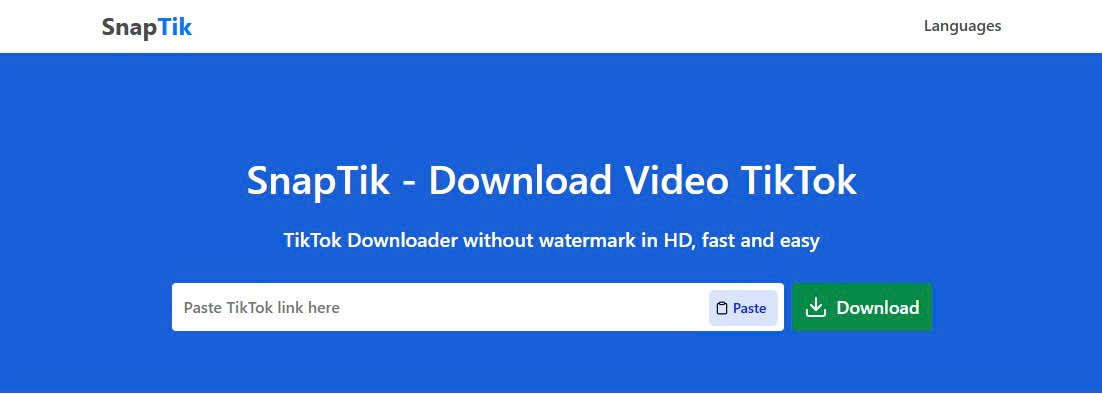
SnapTik Tool can process your link within seconds and provide high-quality downloads
Screen Recording or Screenshots as an Alternative Way
If other methods don’t work, screen recording or taking screenshots is a simple alternative you can use right away. Most smartphones today come with built-in screen recording features, allowing you to capture the entire slideshow while it plays on TikTok without needing any additional tools. This approach is quick, flexible, and works in almost any situation.
However, this method may not provide the same level of quality as direct downloads and often requires some editing afterward. Still, if you only need to save content for offline viewing or personal use, it remains a practical and accessible option. Just make sure to record in high resolution and avoid unnecessary screen interactions during recording for the best results.
Best Ways to Reuse TikTok Slideshows After Downloading
Once you’ve downloaded a TikTok slideshow, you can do more than just watch it offline - you can creatively reuse it to produce fresh content and save time in your workflow. Some popular ways include:
-
Reposting on Instagram Reels or YouTube Shorts: Turn your TikTok slideshow into short content for other platforms and reach a wider audience.
-
Creating compilation videos: Combine multiple slideshows into longer videos to tell a story or showcase highlights.
-
Editing with music, effects, and text: Customize the original slideshow with background music, stickers, filters, or text to create a unique version of your own.
-
Using for personal branding or marketing: If you’re a content creator or influencer, downloaded slideshows can become raw material for building your brand or sharing messages.
Beyond that, reusing slideshows helps you maintain a consistent content style and engage viewers across multiple platforms. By pairing them with simple editing tools, you can turn original slideshows into more exciting, eye-catching content while keeping the fun and creative vibe that makes TikTok so appealing. This approach not only saves time but also lets you produce high-quality content perfectly suited for Gen Z: watch fast – play fast – create fast.
Conclusion
Downloading TikTok slideshows without a watermark has never been easier. Whether you use the in-app download feature, trusted third-party apps, reliable online tools, or screen recording, there’s a method for every situation and device. By combining these download methods with creative reuse tips, you can turn your slideshows into fresh, engaging content ready for Instagram Reels, YouTube Shorts, or personal projects. Not only does this save time, but it also keeps the fun, creative vibe that makes TikTok content so addictive. Don’t wait - start saving and reusing your favorite slideshows in seconds, completely watermark-free. Use trusted tools for the best quality downloads and unlock endless possibilities to create, share, and impress your audience.