In today’s digital world, where TikTok is not only a source of entertainment but also a daily inspiration, turning your favorite videos into phone wallpapers has become a popular trend among young users. Instead of just saving or sharing them, you can now bring those memorable moments directly to your lock screen or home screen. With just a few simple steps, without any complicated setup or third-party apps, you can easily refresh your phone with a more personal style. This guide will show you a quick, easy, and beginner-friendly way to do it in just seconds.
Why This Trend is Becoming so Popular
Nowadays, smartphones are no longer just communication tools but have become a personal space to express lifestyle and individuality. As a result, wallpaper choices have also evolved with new trends. Instead of using static images as before, many young users are now switching to TikTok videos as wallpapers to create a more unique and dynamic experience every day.
-
Makes the phone screen more lively and visually engaging compared to traditional static wallpapers
-
Clearly reflects personal style, taste, and interests through favorite TikTok videos
-
Easy to find suitable content thanks to TikTok’s massive and diverse library of videos, covering entertainment, music, emotions, and more
-
Creates a fresh feeling every time you unlock your phone, avoiding the usual sense of boredom in daily use
-
No editing skills or complicated software required - just a few simple steps to set it up instantly
Beyond aesthetics, using TikTok videos as wallpapers also offers a high level of personalization, turning the phone into a true personal space for modern users.
Smartphones are no longer just communication tools but have become a personal space to express lifestyle and individuality
Step-by-Step How to Turn TikTok Videos into Phone Wallpapers in Seconds
After understanding why this trend has become so popular among smartphone users, you can now start creating your own dynamic TikTok wallpaper in just a few minutes. One of the biggest advantages of this method is its simplicity - you don’t need to install any complicated third-party apps or use advanced editing tools. Everything can be done directly from your phone with just a few taps.
This feature allows you to transform any favorite TikTok video into a live wallpaper for both your lock screen and home screen, making your phone more personalized and visually engaging. Whether it’s a funny clip, a motivational moment, or a trending video, you can easily bring it to life on your screen.
The process is designed to be beginner-friendly, so even if you are not tech-savvy, you can still follow along without any difficulty. Just make sure your device supports live wallpaper or Live Photo features before starting.
If the video cannot be converted directly, you can use tools like SnapTik to download it first and then continue the setup process.
-
Step 1: Open the TikTok app and browse for the video you want to use as your wallpaper
-
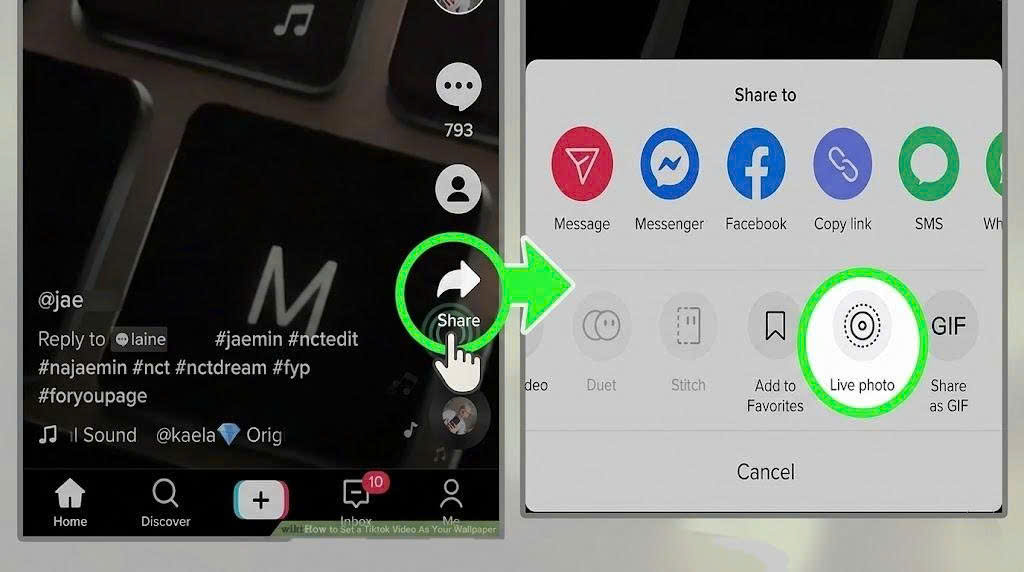
Step 2: Tap the Share button and select the Live Photo option (or similar feature depending on your device)
-
Step 3: Wait for TikTok to process the video and convert it into a compatible format
-
Step 4: Go to your phone’s Setting, then open the Wallpaper section
-
Step 5: Select the newly created Live Photo and apply it as your lock screen or home screen wallpaper
Once completed, your selected TikTok video will instantly become a live wallpaper, giving your phone a more dynamic and personalized look every time you unlock it.
Things to Know before Setting a Video Wallpaper
Before setting a TikTok video as your phone wallpaper, it’s important to understand a few key points to ensure a smooth experience and avoid potential issues. Although the process is quite simple, not all devices fully support this feature, and some technical factors may affect how it works on your phone.
-
Not all phones support Live Photo or live wallpapers, especially some older Android devices
-
Some TikTok videos may not be convertible due to privacy settings or restrictions from the original creator
-
Live wallpapers usually consume more battery compared to static wallpapers, especially with frequent use
-
It’s recommended to choose high-quality videos to ensure clear display on your screen
-
Avoid using overly long or heavy videos to keep your device running smoothly
Understanding these points will help you use TikTok videos as wallpapers more effectively, ensuring better performance and a more stable experience in your daily phone usage.
Which Devices Support Live Wallpapers
Not all smartphones support the feature of using TikTok videos as wallpapers, so it’s important to check whether your device is compatible before trying to set it up. In general, the ability to use videos as wallpapers depends on your operating system version and whether your device supports Live Photo or live wallpaper functionality.
-
iPhone devices (iOS 11 and above) support Live Photo wallpapers, allowing users to easily set TikTok videos as animated lock screen wallpapers
-
Newer Android devices (especially Samsung, Xiaomi, OPPO, etc.) usually support live wallpapers through built-in system settings
-
Some Android devices may require built-in system support, but most do not need any third-party apps
-
Older or low-end smartphones may not support live wallpapers due to hardware or software limitations
-
Device performance and battery optimization settings can also affect how smoothly live wallpapers run
Overall, most modern smartphones already support this feature, making it easy for users to turn TikTok videos into dynamic wallpapers without complicated setup steps.
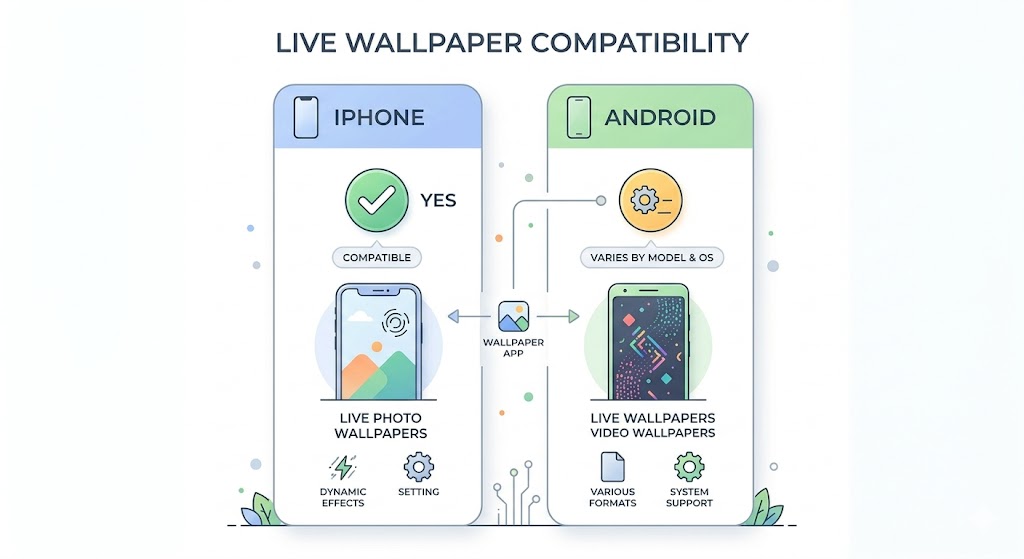
Most modern smartphones already support this feature, making it easy for users to turn TikTok videos into dynamic wallpapers without complicated setup steps
Common Issues and How to Fix them
During the process of setting a TikTok video as your phone wallpaper, you may sometimes encounter issues that prevent it from working as expected. Below are the most common problems and their corresponding solutions to help you fix them easily.
-
No Live Photo or live wallpaper option appears when sharing from TikTok - This usually happens when your device or app is not fully updated. You should update TikTok to the latest version and check whether your phone supports this feature.
-
Video does not display correctly after being set as wallpaper - You should try recreating the Live Photo or selecting a different video to ensure the conversion process is not faulty.
-
Wallpaper is laggy, stuttering, or not smooth - This is often related to device performance. You should close background apps or avoid using heavy, high-effect videos.
-
Unable to convert the video due to privacy restrictions - In this case, simply choose another video that is available for download or allowed to be used.
-
Only works on one screen (lock screen or home screen) - You should recheck the wallpaper settings and apply it to both screens if your device supports it.
Overall, these issues are not serious and can usually be fixed quickly once you identify the cause, helping you enjoy a smoother and more stable experience when using TikTok videos as wallpapers.
Conclusion
Using TikTok videos as phone wallpapers has become an exciting trend that allows users to personalize their devices in a unique way. With just a few simple steps, you can turn your favorite videos into dynamic and eye-catching live wallpapers. However, to ensure a smooth experience, you should pay attention to device compatibility as well as video quality. If any issues occur, you can usually fix them quickly by checking your settings or applying basic troubleshooting methods. Overall, this is a simple yet effective way to refresh your daily phone experience. If you found this guide helpful, try it out now and share it with your friends.