Have you ever struggled to find a video you just watched on TikTok? This is a very common situation for users. In fact, TikTok stores your entire activity history, including watched videos, liked content, comments, and even search history. This makes it easy to revisit old content or track your usage habits. This article provides all the steps to view your TikTok activity history in the simplest and fastest way in 2026.
What Is TikTok Activity History and Why Is It Important?
Activity history on TikTok is where all your actions on the platform are recorded. This includes videos you’ve watched, videos you’ve liked, comments you’ve posted, and even the keywords you’ve searched for.
All of this data is stored in the Activity Center, allowing you to easily access and review it whenever needed. Notably, your watch history can be stored for up to 180 days (6 months).
So, why is this feature important?
-
It helps you quickly find videos you’ve watched before: While scrolling TikTok, it’s easy to come across interesting videos but forget to save them. Activity history allows you to revisit previously watched content without having to search again from scratch.
-
It helps you better understand your habits and preferences: By reviewing your watch history, liked videos, and search activity, you can identify the types of content you engage with most. This makes it easier to personalize your TikTok experience.
-
It is useful for content creation: For creators, reviewing past interactions can help analyze trends, identify effective content formats, and understand what captures audience attention. This becomes a valuable source of inspiration for new content ideas.
-
It helps manage and monitor usage: Activity history is also a useful tool for tracking how you or others use TikTok. This is especially important for parents who want to monitor the type of content their children are exposed to.
-
It improves your overall TikTok experience: By understanding what you’ve watched and interacted with, you can use TikTok more intentionally, from revisiting content to shaping better recommendations from the platform.
Overall, understanding and using TikTok activity history allows you to better control your experience and make the most out of what the platform has to offer.
Activity history on TikTok is where all your actions on the platform are recorded.
How to View Your Watch History on TikTok
TikTok allows you to review all the videos you’ve previously watched through the Watch History feature. This is especially useful when you want to find a video again but forgot to save it.
Currently, TikTok stores your watch history for up to 180 days (6 months) and organizes it by date, making it easier to locate specific content.
Steps to view your watch history on TikTok:
-
Open the TikTok app and go to your Profile
-
Tap the menu (☰) icon at the top
-
Select Settings and Privacy
-
Tap Activity Center
-
Choose Watch History
Once you access this section, you will see a list of videos you’ve watched, sorted by date. You can scroll through to quickly find the content you’re looking for.
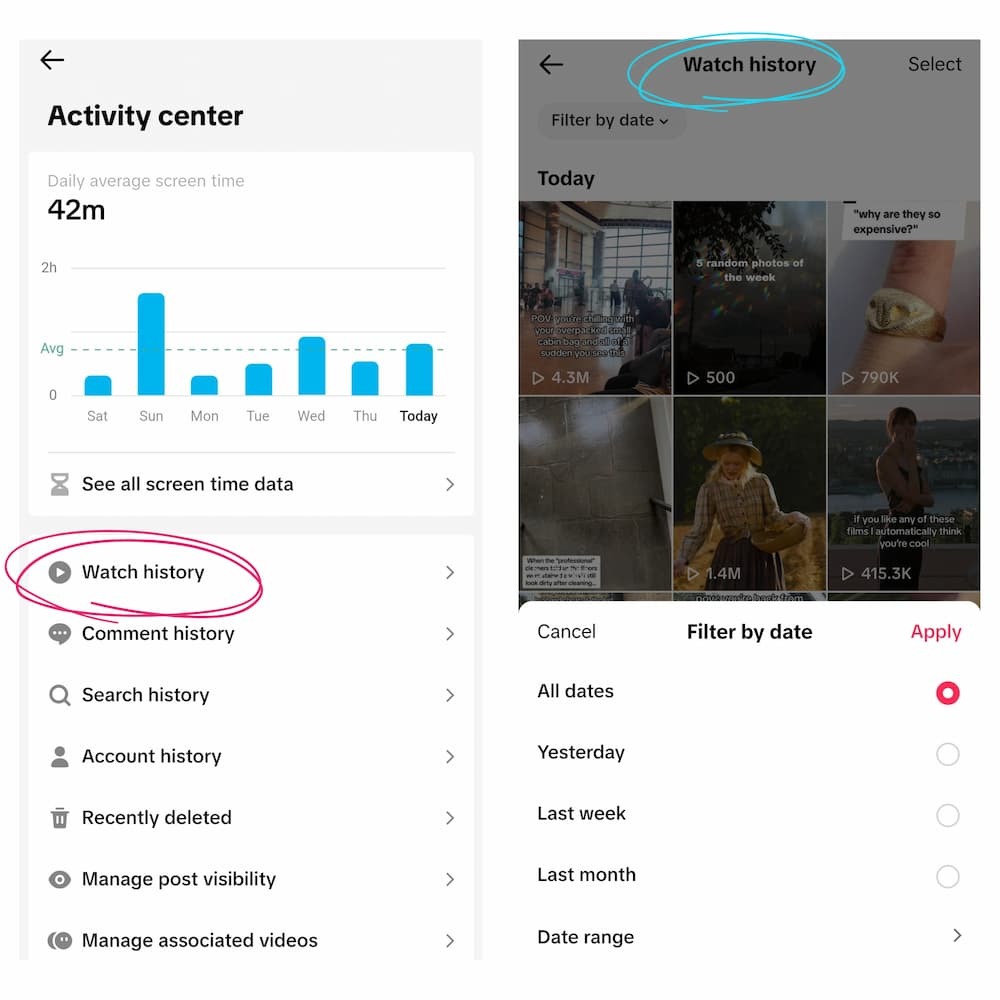
View Your Watch History on TikTok
How to delete watch history:
TikTok also lets you manage your watch history if you don’t want certain videos to be saved:
-
Tap Select at the top of the screen
-
Choose the videos you want to remove
-
Tap Delete to complete the process
Tip: Find Watched Videos Using Search . on TikTok
You can also type a dot (.) in the TikTok search bar to quickly find videos you may have watched before.
This method is not as accurate as Watch History, but it’s useful when you don’t remember keywords or want to rediscover similar content.
Regularly checking and managing your watch history not only helps you find content easily but also improves your overall TikTok experience based on your personal preferences.
How to View Liked Videos on TikTok
In addition to watch history, TikTok also allows you to quickly access the list of videos you’ve liked. This section stores all the content you’ve previously liked, making it easy to revisit anytime.
This feature is especially useful when you want to keep track of interesting videos without downloading them or adding them to favorites.
Steps to view liked videos on TikTok:
-
Open the TikTok app and go to your Profile
-
Tap the heart icon tab
-
Browse the full list of videos you’ve liked
Here, videos are displayed based on the time you interacted with them. You can simply scroll to find the content you’re looking for.
Privacy note:
By default, your liked videos are only visible to you. However, you can change this setting if you want others to see them:
-
Go to Profile - Tap the menu (☰)
-
Select Settings and Privacy
-
Tap Privacy
-
Choose Liked videos
-
Select your preferred visibility (e.g., “Everyone”)
Using the liked videos section not only helps you save important content but also allows you to build a personal video library on TikTok conveniently.
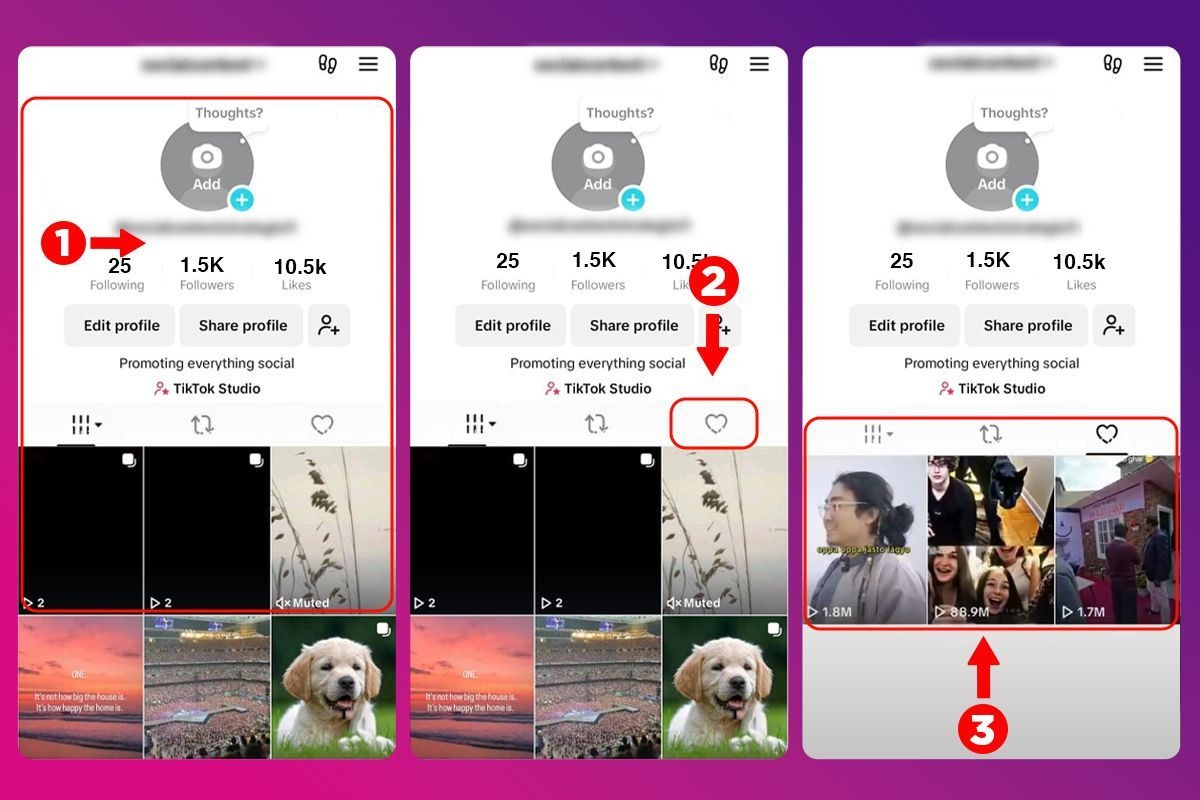
TikTok also allows you to quickly access the list of videos you’ve like
How to View Comment History on TikTok
TikTok allows you to review all the comments you’ve posted through the Comment History feature. This makes it easy to check your past interactions or edit and delete comments that are no longer relevant.
This is a useful tool if you frequently engage on TikTok and want to manage your activity more effectively.
Steps to view comment history on TikTok:
-
Open the TikTok app and go to your Profile
-
Tap the menu (☰) icon
-
Select Settings and Privacy
-
Tap Activity Center
-
Choose Comment History
Once you access this section, you will see all your posted comments displayed in chronological order. You can tap on each comment to view it within the original video.
How to delete a comment:
If you want to remove a comment you’ve posted, follow these steps:
-
Tap on the comment to open the related video
-
Long-press on your comment
-
Select Delete to complete the process
Regularly checking and managing your comment history helps you stay in control of your interactions and ensures a better overall experience on TikTok.
How to View Search History on TikTok
TikTok also stores all the keywords you’ve searched for through the Search History feature. This allows you to easily revisit content you were previously interested in without having to type it again.
Normally, the search bar only shows your most recent searches. However, to view your full search history by date, you need to access the Activity Center.
Steps to view search history on TikTok:
-
Open the TikTok app and go to your Profile
-
Tap the menu (☰) icon
-
Select Settings and Privacy
-
Tap Activity Center
-
Choose Search History
Once you access this section, you will see a list of your past searches organized by date. This makes it easier to track the content you’ve looked for before.
How to delete search history:
If you want to protect your privacy or clean up your data, you can delete your search history as follows:
-
Tap Select at the top of the screen
-
Choose the items you want to remove
-
Tap Delete to complete the process
Managing your search history not only helps protect your privacy but also allows you to better control your overall TikTok experience.
How to Restore Deleted Videos on TikTok
When you delete a video on TikTok, it is not permanently removed right away. Instead, it is temporarily stored in the Recently Deleted section. This allows you to restore the video within 30 days after deletion.
This feature is especially useful if you accidentally delete a video or want to recover previously posted content.
Steps to restore deleted videos on TikTok:
-
Open the TikTok app and go to your Profile
-
Tap the menu (☰) icon
-
Select Settings and Privacy
-
Tap Activity Center
-
Choose Recently Deleted
-
Select the video you want to restore
-
Tap Restore
Once completed, the video will be restored to your profile as it was before being deleted.
Important notes:
-
Videos can only be restored within 30 days
-
After this period, the video will be permanently deleted and cannot be recovered
Understanding how to restore deleted videos helps you avoid losing important content and ensures a smoother TikTok experience.
Tips to Manage Your TikTok Activity History Efficiently
To get the most out of your activity history on TikTok, consider the following tips:
-
Regularly check your watch history: This helps you quickly find useful content and stay organized without losing track of videos.
-
Use tools like SnapTik to save videos you want to keep: This ensures you can access important content anytime without relying only on TikTok history.
-
Delete unnecessary search history: Clearing old searches helps protect your privacy and keeps your account data clean.
-
Save important videos instead of relying only on history: While history is helpful, saving videos ensures you won’t lose valuable content.
-
Review your liked videos periodically: This allows you to organize your content preferences and remove videos that are no longer relevant.
-
Use activity history to improve your content strategy: If you are a creator, analyze the types of videos you interact with to understand what works and apply it to your own content.
Conclusion
Understanding how to view your activity history on TikTok helps you take full control of your experience on the platform. From watch history and liked videos to comments and search history, everything is stored in one place for easy access. Whether you want to find a video you forgot to save, manage your interactions, or analyze your content habits, the Activity Center provides all the tools you need. For content creators, it can also be a valuable resource to track trends and improve future content. By using these features effectively, you can make your TikTok experience more organized, personalized, and efficient.